Start free trial
An add-on for Tekmetric

Your shop software knows the margin. It just never tells you.

Every repair order in Tekmetric already carries part cost, part retail, labor rate, billed hours and what the customer declined. Garage OS does the arithmetic your reports won't — live, in the ticket, while there's still time to fix it.

Start a 14-day trial See it running → Two-minute install. No data migration. Nothing changes in Tekmetric.
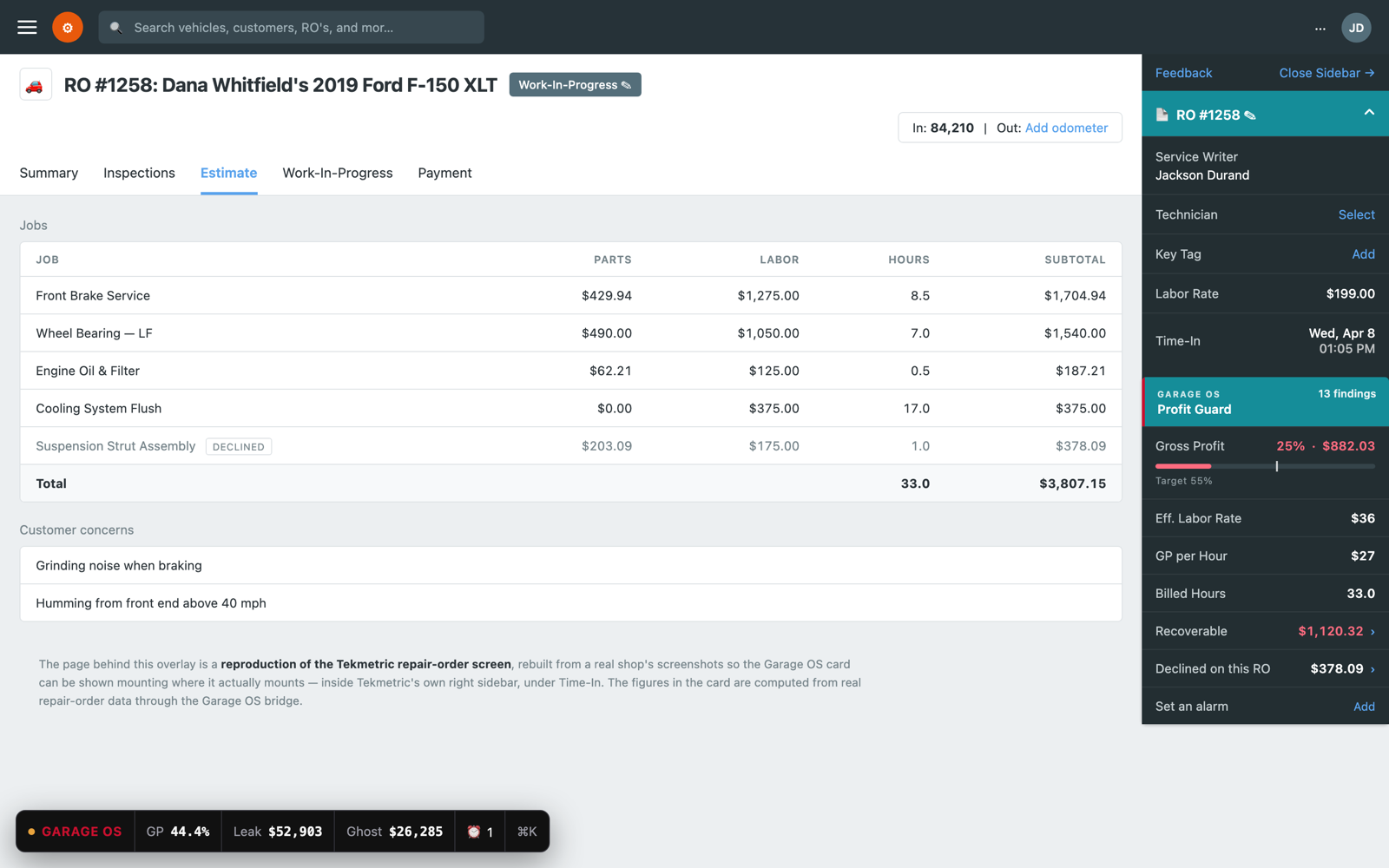
The Garage OS Profit Guard card mounted inside Tekmetric's own right sidebar, under Time-In, showing 25% gross profit against a 55% target and $1,120.32 recoverable.
Profit Guard mounts inside Tekmetric's own sidebar, under Time-In — not on top of it. Every number computed from Tekmetric's own API.
4 minTo first leak found
0Changes to your workflow
Read-onlyNothing written to your shop
$149Per shop, per month
The gap

Tekmetric runs the shop. It doesn't watch the margin.

These are the complaints shop owners leave on public review sites. Every one of them is a thing Garage OS was built to close.

"Everything takes a million mouse clicks. Navigation isn't obvious."

Verified reviewer
⌘K opens a command palette over any Tekmetric page. Customer, vehicle, ticket or action, one keystroke away.

"Reports improved but I still have to custom-calculate to get what I want. The customizable report doesn't include all the data I need."

Verified reviewer
Gross profit, effective labor rate and GP-per-hour computed per job, per ticket, per day — no export, no spreadsheet.

"The invoice bottom line is obscure."

Verified reviewer
A permanent margin readout on the ticket, with the exact lines dragging it down and what each one costs.

"I wish there was an alarm or reminder on individual tickets. It would help so much in a busy shop."

Verified reviewer
Per-ticket alarms, plus automatic ones when a job stalls in WIP or an estimate goes cold.
Profit Guard

Catch the leak before the ticket is posted.

Tekmetric shows you margin in a report, next month. Garage OS shows it in the ticket, now — and names the line that's bleeding.

01

Parts matrix enforcement

Your matrix exists. Advisors hand-type over it every day.

  • Grades every part line against your own cost tiers
  • Flags anything priced at or below cost
  • Shows the exact dollars the override cost you
02

Labor truth

Built from your history, not a labor guide that's "full of holes".

  • Learns what each job actually takes at your shop
  • Warns when a quote is short of your own 75th percentile
  • Effective labor rate and GP per billed hour, live
03

Honest numbers

A margin figure you can't trust is worse than none.

  • Subtracts real technician cost from pay type and rate
  • Tells you when parts are missing cost and the GP is fiction
  • Separates recoverable dollars from advisory context
Live on the ticket

It mounts inside Tekmetric's sidebar.

Not a floating box parked over the page. Garage OS finds Tekmetric's own repair-order sidebar and adds a card beneath Time-In, matching its type, spacing and colour. Advisors read it as part of the screen they already know. Close the sidebar and it becomes a docked panel instead.

  • Red means recoverable — it's counted in the ticket total
  • Grey means context — real, but adding it would double-count
  • Identical findings roll up instead of flooding the list
  • Collapses to a tab when you want the screen back
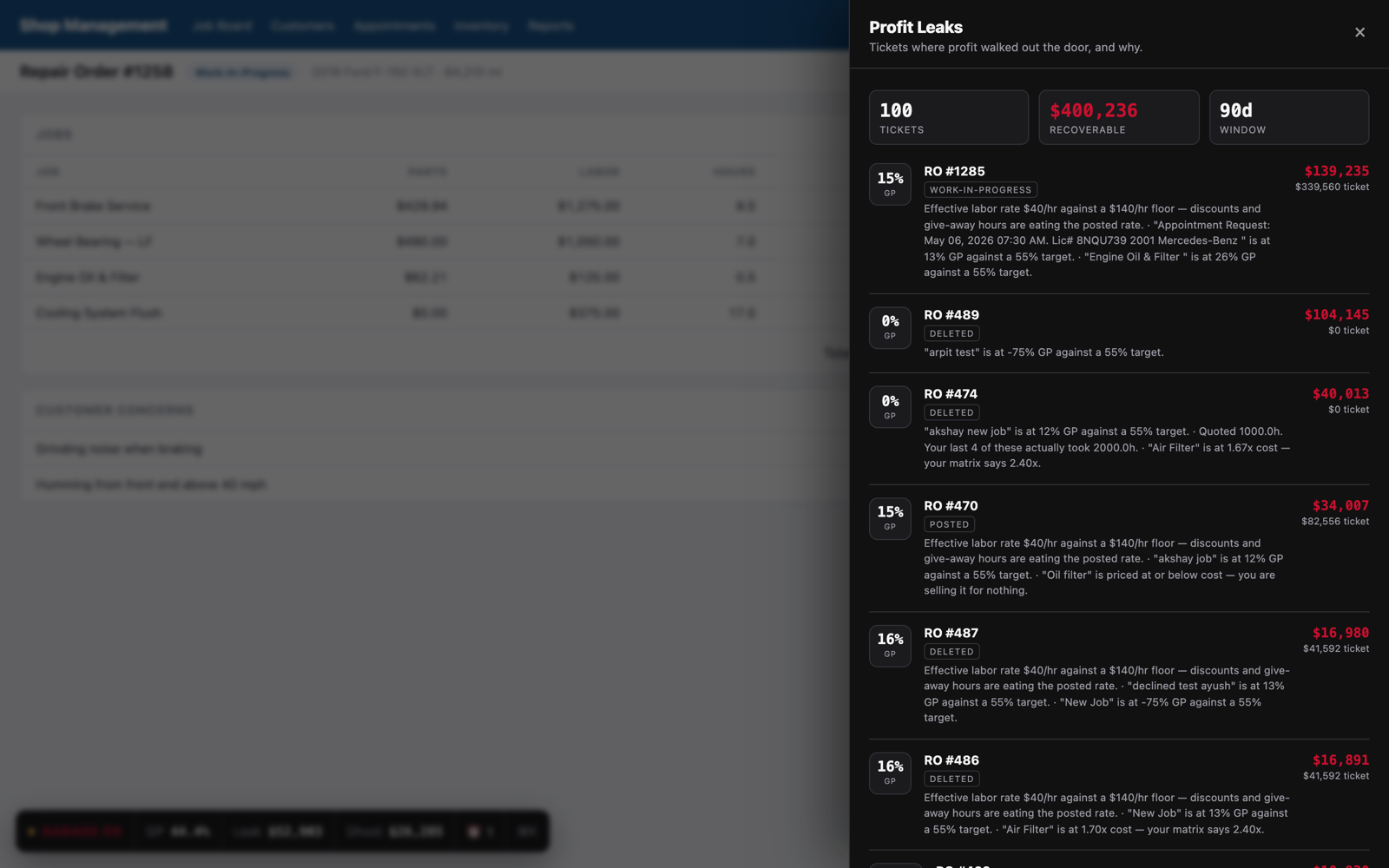
The Profit Leaks drawer listing repair orders ranked by recoverable dollars.
Ghost Revenue

The work they said no to is still worth money.

Tekmetric records declined jobs and prints them on the invoice. Then nothing happens. Garage OS prices the pile, ages it, and ranks it by how likely each job is to close — so the follow-up list writes itself.

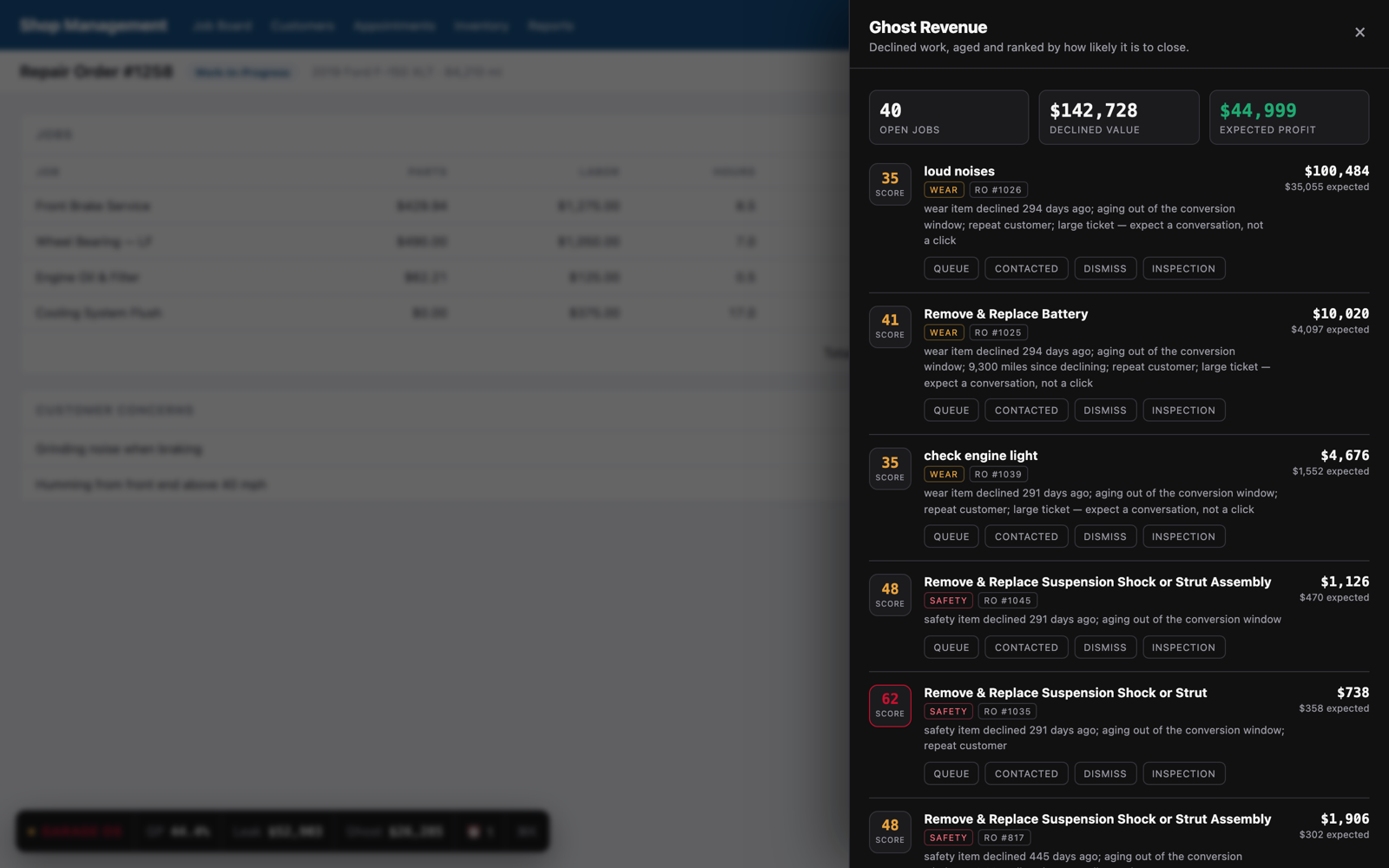
Ghost Revenue drawer showing declined jobs scored 0-100 with the reasoning behind each score.

Scored on signals you already own.

No black box. Every score comes with the sentence that produced it, so a service manager can argue with it — which is the only way they'll ever use it.

  • What it was. Safety, wear, routine or cosmetic — each decays differently
  • How long ago. Three weeks to eight months is where declines convert
  • Miles since. Brakes declined 4,000 miles ago is a different call
  • Who they are. A six-visit regular answers the phone
  • Closes itself out when the job comes back authorized
Speed & alarms

Stop clicking. Start typing.

⌘K, anywhere in Tekmetric.

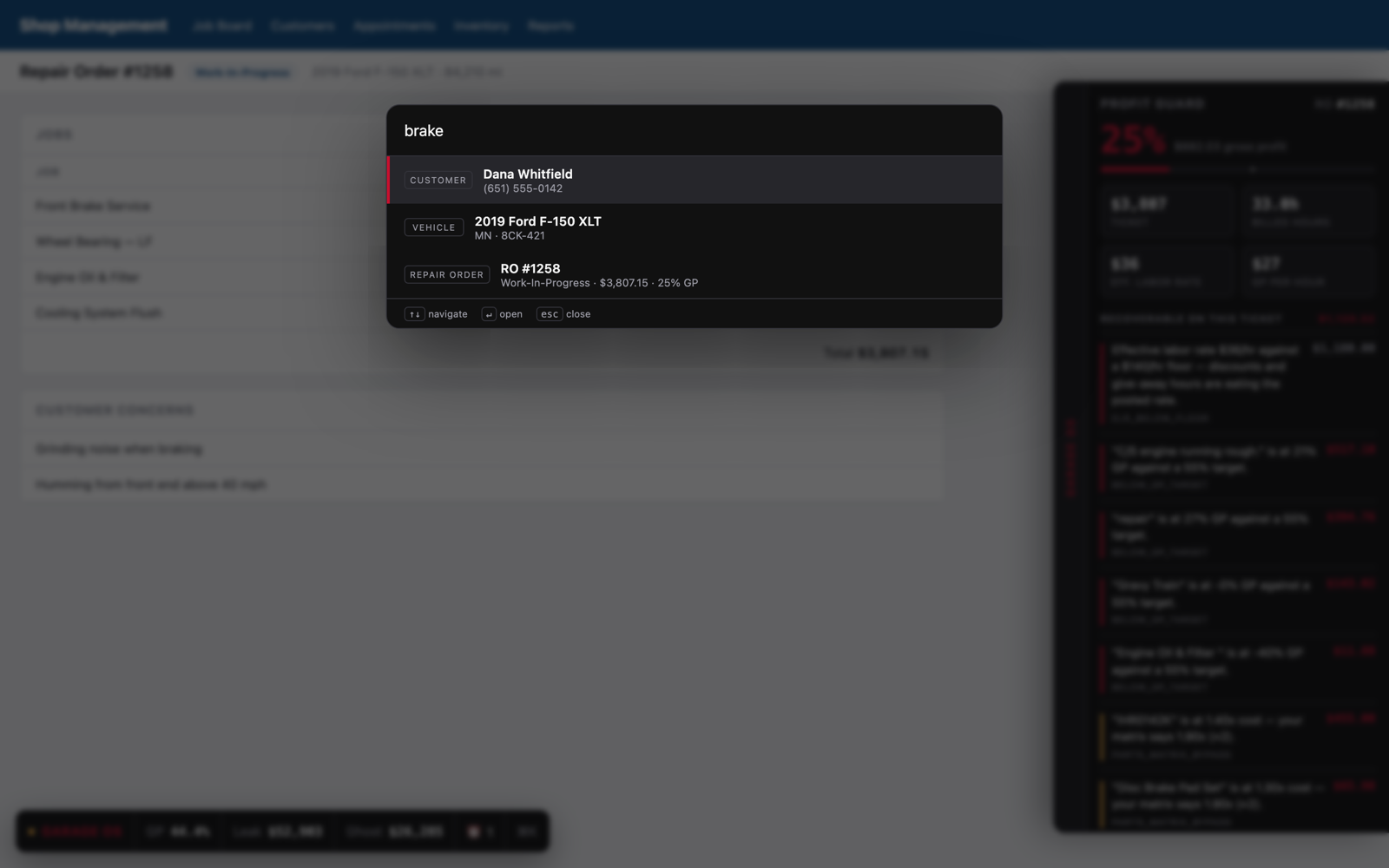
One shortcut. Search customers, vehicles and repair orders in the same box, or jump straight to a Garage OS panel. Arrow keys and Enter — your hands never leave the keyboard.

  • Repair orders answer instantly from local cache
  • Customers and vehicles come live from the Tekmetric API
  • Every panel is also a command

Alarms that actually fire.

Set a reminder on a ticket the way you'd set one on your phone. Garage OS also raises its own when a job stalls in WIP or an estimate goes quiet past your threshold — and the notification reaches you even with every Tekmetric tab closed.

The command palette open over Tekmetric with customer, vehicle and repair order results.
Install

Two minutes, and nothing in Tekmetric changes.

Add the extension

Install it in Chrome on every workstation. It only ever activates on Tekmetric.

Paste your shop key

One key connects the extension to your shop. Tekmetric credentials stay on our server — the browser never sees them.

Open a ticket

The first sync backfills your history and builds your labor baseline. Leaks show up on the first repair order you open.

Garage OS reads through the official Tekmetric API and receives your shop's webhooks. It does not write repair orders, move jobs, message customers, or alter a single record.

Pricing

One price. Every seat in the shop.

$149 /month per shop
  • Unlimited users — advisors, techs, owner
  • Profit Guard on every repair order
  • Ghost Revenue scoring and pipeline
  • Per-ticket and automatic alarms
  • ⌘K command palette
  • Full history backfill and labor baseline
  • No contract, no per-seat pricing, cancel any time

What it has to find to pay for itself

One part under matrix, weekly$38
One shop fee missed, weekly$27
One declined brake job recovered, monthly$310
Monthly recovery$570

Illustrative, using conservative single-bay numbers. Your actual figure appears on your dashboard the day you connect — computed from your own tickets, not ours.

Questions

The ones that matter.

Does this change anything in Tekmetric?

No. Garage OS reads your shop through the official Tekmetric API and renders its own panel on top of the page. It never writes a repair order, never edits a job, never messages a customer. If you uninstall it, Tekmetric is exactly as you left it.

Where do my Tekmetric credentials live?

On our server, never in the browser. The extension holds one shop key that can only ask our bridge for computed numbers. It cannot reach Tekmetric's API on its own.

How is gross profit calculated?

Parts revenue minus parts cost, plus labor revenue minus technician cost, plus fees, minus discounts. Technician cost is derived from each employee's pay type and rate — flat rate on billed hours, hourly on clocked hours, salary amortized over 2,080 hours — with a configurable loaded-cost fallback. When parts are missing cost data we tell you the margin is unreliable rather than quietly inflating it.

Is this another marketing CRM?

No. Plenty of tools already text your customers. None of them tell you that the advisor just sold a $400 part at 1.2× cost. Garage OS points inward at the shop's own economics.

What about multiple shops?

Each shop connects separately with its own key, targets and parts matrix. One extension install handles whichever shop the browser is looking at.

What if my numbers look wrong on day one?

They probably will, and that's the point. Most shops discover their parts cost data is incomplete or their labor rates were never set. Garage OS shows you the confidence level alongside the number so you know what to fix first.